Open Groceries to shop for the meals you plan to cook. Choose the dates for this trip, then check what you need to buy and what you already have.
Choose what to shop for
- On Groceries, tap the button that names the date range and meal count to open Choose dates & meals.
- Set Date range and pick the dates or dishes you want to include.
- Tap Done. From a day in Calendar, you can also open the groceries for that day.
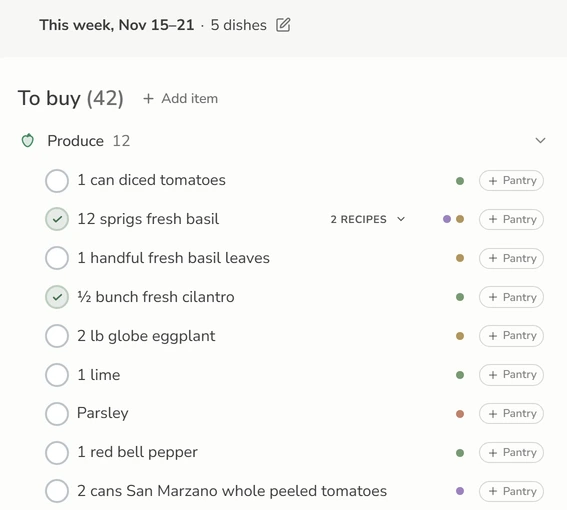
Find an item and check its amount
Search for an ingredient or the recipe that needs it. Use View by category (aisle) to shop by aisle or View all for one alphabetical list. Tap an aisle heading to fold or unfold its items.
If an amount reads Summarized, tap it to show the full volume. This can happen when an ingredient is used only in simple breakfasts or lunches.
An amount starting with ≈ is rounded up to make shopping easier. If the item shows a recipe count, tap that count to see which dishes need it.
Check off and return items
Tick an item in To buy when you've bought it or you already have it. Open Already on hand to see checked items and ingredients that match stocked staples. Use the checkbox there to put an item back on To buy. This can also update its stock in Pantry.
Use + Pantry to start tracking a staple, and the restock option to include out-of-stock staples. Check that you have enough at home for the meals you're shopping for.
Change your shopping list
Use Add item in To buy for something extra. Tap an item's name to edit it where available. Save the change, or use the remove control on an item you added to take it off the list. Changes to groceries leave the saved recipes as they were.
Use Undo or Redo for supported edits or checkoffs.

Copy, download your grocery list
Open Share grocery list to copy unchecked items or download a text file.