Use the AI option under Add recipe to turn a dish you have in mind into a recipe or ask for ideas. This is available on the Essentials or Complete subscription.
Choose what to make
- In Recipes, tap Add recipe, then the AI recipe option, such as Discover with AI or Create with AI.
- Pick the Meal and Course. Choose a main, or an available course such as a side, dessert or beverage.
- Choose Original recipes for recipes DinDin writes or Curated recipes for recipes based on real recipes from the web.
- Inspire me lets DinDin choose the dish using tastes such as cuisines and adventurousness.
- I have something in mind starts with the dish you name. If it matches a recipe you saved, you can use that recipe or request another version.
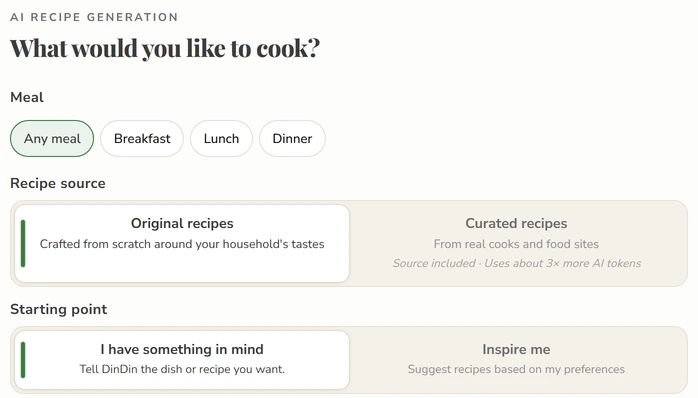
The available courses depend on the meal. If a pairing doesn’t fit, DinDin adjusts one choice and shows which one changed. For a snack choose Main or Beverage. For a dessert choose Lunch or Dinner, then Dessert.
Guide this request
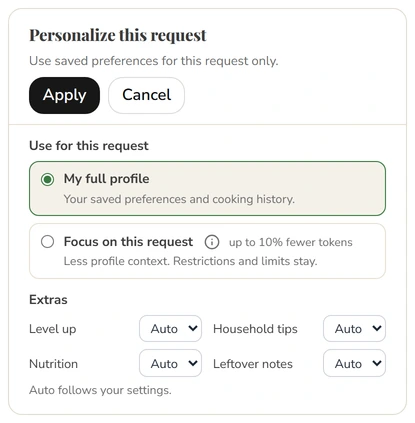
If Who's eating? is offered, choose who the recipe is for. Under Personalizing for you, choose My full profile to use your usual preferences or Focus on this request to set ordinary preferences aside. Household exclusions stay on the request.
To change just a few choices, use Refine. Adjust Preferences or pick Auto, On or Off for available Extras, then tap Apply. Put a one-time instruction such as using a different cut of meat in Special notes. These choices apply to this request.
Review and save
- Run the request with the button that generates or finds the number of recipes you picked.
- Read the results and any notes about how well they fit. Choose Save for later or Discard.
- Tap Save recipes to keep your picks.
If you want a new recipe on a particular date, start from the meal on Calendar.