On Calendar, add a placeholder for a meal like dinner out that doesn't need a recipe. Skip a meal when you want to leave it off your plan entirely.
Name a meal without a recipe
- Open the date and the meal you want to name.
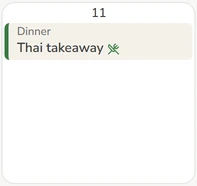
- On an empty meal, tap its add button, such as Add dinner, and choose Placeholder meal.
- Type a short title, such as Thai takeaway. It saves as you type.
To change the title, open the placeholder. For dinner, tap Choose a dinner to replace it with a recipe. Use Remove placeholder to open the meal for planning again. A title that names the food can help DinDin pick something different on nearby nights.
Skip and reopen a meal
Skip a meal when you want DinDin to leave it off the plan. Skips and placeholders stay as they are when you run Finish my week and add no ingredients to Groceries.
For one meal, open its tab and use the skip button that names the meal, if offered. To skip the day, open More actions and tap Skip day. If there are dishes or placeholders already planned, check what will be removed before you confirm.
When you want to plan again, open the date and use the matching button, such as Unskip lunch for a meal or Unskip day for the whole date. Use a personal note if you only want to leave yourself a reminder.