Use Plan on Calendar to see which meals are open and pick recipes for them. You can start a week from scratch or add to one you've started.
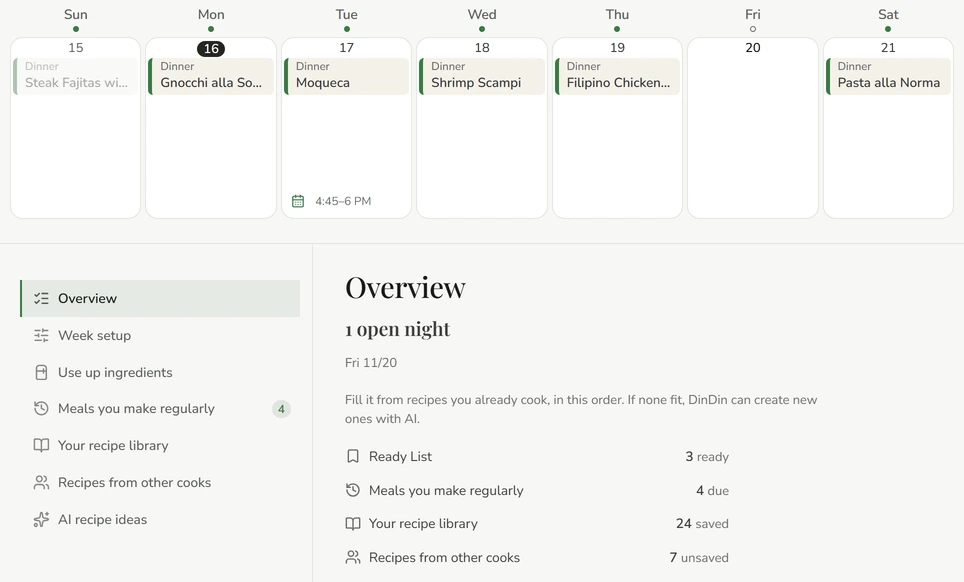
Check what needs planning
In Overview, look under Meals or Dinners. Open means you can still plan the meal. Left open means it has already passed. A meal can be open for some people even if others have a dish. Open a dish by tapping its name. If a meal needs an early start, its row tells you when to begin.
Open Week setup to change a night's time or cooking limit, add a note, or mark a meal you already have covered.
Choose what to use
- Use up ingredients helps bring recipes for food you already have into the running.
- Meals you make regularly shows the dinners due to come back.
- Your recipe library shows recipes you've saved.
- Recipes from other cooks shows recipes from cooks you follow.
- AI recipe ideas starts a request for the nights you choose.
Pick one recipe
- Open Your recipe library. Search by recipe name or narrow the list with Filters. Sort by Recently cooked, Recently added or Name.
- Open a recipe you like. If its card shows Best fit, check the suggested dinner night. DinDin considers cooking time, what you've planned nearby and ingredients you want to use. The suggestion doesn't schedule anything.
- Tap Add to calendar. Pick the meal, date and people you want, then tap the button that adds the recipe. You can choose a different date from the one DinDin suggests.
Place several dinners you make regularly
In Meals you make regularly, tap Match to open nights to place due repeats that fit. It only fills open dinners, never replaces a planned dinner, and uses no AI. If none fit, check whether your open nights allow enough cooking time. To fill other gaps automatically, use Finish my week.